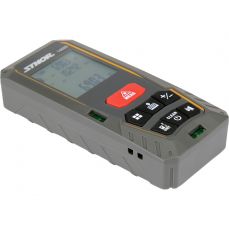
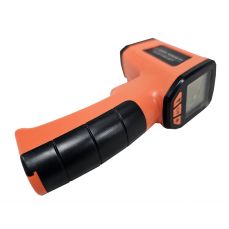
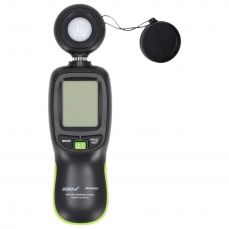
Product description An ultrasonic scaler is a device that uses sound waves to measure the distance of objects from the meter. The measurement is in a straight line in the range of 0.91 m to 15 m. The laser pointer allows you to tell the exact location to which the distance is being measured. Thanks to the built-in memory of three measurements you can calculate the surface and volume of the room. Destination / Application For quick measurement of distances ranging from 0.91 m to 15 m. Measurements can be made by one person. How to use - Battery assembly and replacement: Open the battery cover at the bottom of the device, remove the battery, insert a new battery in its place. Pay attention to the correct polarity. To ensure correct and long-term operation of the device, it is recommended to use alkaline batteries of branded manufacturers. In order to prolong the life of the battery, the meter will go into standby mode after about 35 seconds. To re-enable the meter, press the "MEASURE / ON" button once.
- Turning on the device Switch the side switch of the device to the "NORMAL" position for measurements up to 10 m or to the "LD" position for measurements over 10 m. On the liquid crystal display for about one second, all components will light up after this time. The symbol "0" and the selected distance unit.
- Distance measurement. The pedometer uses the rear edge of the device as a measuring base. The indicated measurement also includes the length of the device. Align the rear edge of the device with the line from which the distance will be measured. Press the "MEASURE / ON" button once, the laser pointer will show, indicating the point to which the distance will be measured. After the distance is measured, a short beep will sound and the measured value will be displayed. When measuring, do not move the pointer, it may disturb the correct measurement. The laser pointer should not be directed towards humans or animals. Do not point the laser beam at your eyes. If the display shows "Error", the measurement range is exceeded or the measurement can not be performed for other reasons.
- Tips for correct distance measurement Some materials such as curtains or blinds can absorb ultrasonic waves. For indoor measurements, expose the windows and make sure they are well closed. If there is an obstacle during the measurement between the meter and the point to which the distance is being measured, it may upset the measurement. If the result of the measurement is uncertain, several measurements should be taken to ensure the accuracy of the result. If the surface to which the measurement is being made is not flat and hard or the measurement takes place in a narrow corridor, this will affect the accuracy of the measurement result. If the measured distance is more than 15 m. Make several measurements shorter than 15 m and add up.
- Entering measurements into memory After the measurement, when the result was displayed. Press the "STORE" button and then "M1", M2 "or" M3 "to aim Choose one of the banks of memory. After saving the result, the symbol of the selected bank will light on the display. To change the value stored in a given bank, enter a new value in the bank, as described above. Pressing and holding "ALL MEMORY CLEAR" button for about 3 seconds will erase data from all memory banks. Likewise, adjusting the switch to "OFF" deletes the memory contents.
- Calculation of surface and volume Once you have made and recorded three measurement results, you can calculate the area and volume of the room. In order to calculate the area, press the "AREA" button and then press the two memory bank buttons to collect the results needed for the calculations. When calculating the volume, press the "VOL" button. The meter automatically retrieves data from all memory banks, counts and displays the cubic capacity of the room.
- Addition and subtraction of measurement results: The meter allows you to add and subtract measurement results stored in memory banks. In order to add the results stored in the memory banks (M1 and M2), first press the "ALL MEMORY CLEAR" button to erase the current display of the meter. Then, by pressing the "+", "M1", "+", "M2", "+", this will add values to the M1 and M2 banks. In the case of subtraction, press the sequence "+", "M1", "-", "M2", "+", this will deduct M1 from M1. To clear the current contents of the screen, press the "ALL MEMORY CLEAR" button.
- Other functions of the meter Press the "LIGHT" button to highlight the contents of the screen. To change the measurement units, press the "FEET / METER" button to change the measurement units from feet to feet
Technical data Index Number 81782 EAN 5906083817823 Marka Vorel PCS unit Gross Weight (kg) 0.2360 Master Carton MC 36 Inner Box IB 6 Pal 432 Measurement accuracy (typical) 0.5 Calculating volume + Calculation of surface + Measurement memory 3 Maximum range 15 Minimum range 0.91 lcd Functions of trigonometric calculations yes Addition and subtraction functions yes Continuous measurement function does not Base measurement reference points
Available Delivery Methods: Pickup at Latvijas Pasts branch, Courier delivery to home — Express Pasts, Pickup from our warehouse, Daugavpils
Bank Transfer (Invoice)
Pay at any bank.
Available Delivery Methods: Pickup at Latvijas Pasts branch, Pickup at Omniva parcel locker, Courier delivery to home — Express Pasts, Pickup from our warehouse, Daugavpils
Online Payment (i-Bank)
Pay conveniently and quickly via internet banking: Swedbank, SEB, LPB, Luminor, Citadele, Revolut, Rietumu, N26, Paysera, Wise
Available Delivery Methods: Pickup at Latvijas Pasts branch, Pickup at Omniva parcel locker, Courier delivery to home — Express Pasts, Pickup from our warehouse, Daugavpils
Bank Card
Pay with a bank card upon delivery.
Available Delivery Methods: Pickup at Latvijas Pasts branch, Courier delivery to home — Express Pasts